Monday, March 2, 2015

HF Update to RTL Bridge

Amateur radio astronomer Jim Brown in Pennsylvania recently successfully used a RTL Dongle, Ham-It-Up converter, and a preamp/filter built by Richard Flagg, AH6NM.  Jim said I could use one of the images and here it is below.

Jupiter noise bursts captured by Jim Brown and an RTL Dongle plus RTL Bridge and Radio-Sky Spectrograph software.
I don't want to say too much about Jim's observation as I think he might write it up, but I can say that he was using my software, Radio-Sky Spectrograph (RSS), in conjunction with RTL Bridge.  This proof of concept observation should be encouraging to those who would like to make spectral observations of Jupiter and the Sun using an inexpensive dongle receiver.  Though not as informative as the 10 MHz wide spectrograms we have been seeing in the Radio Jove project, the spectral information does make it easy to identify Jupiter.

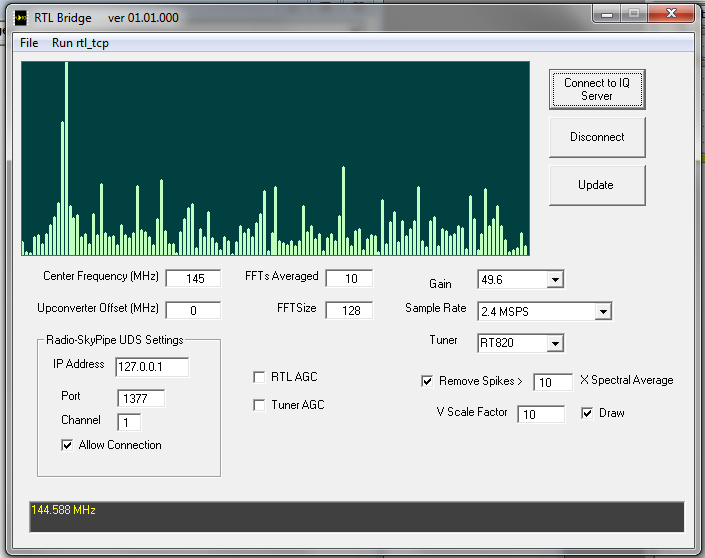
Recently I was able to take some time to experiment with Oliver Jowett's  low frequency patch for the Osmocom drivers that allows extending the range of the RTL+R820T below the usual 24 MHz limit without a upconverter or hardware modification.  Using a 2.04 MSPS rate, I was only able to see signals down to about 15 MHz, but many people have reported going much lower.  So while at the time I write this no one has recorded Jupiter with a "naked" dongle, I hope someone will give it a shot soon.  To help push that along I have repackaged RTL Bridge and RSS with the patched drivers.  I have also made a couple of changes to RTL Bridge and RSS.  In RTL Bridge there is now factor that can be used to scale the data appropriately for output.


The new Data Scale Factor is multiplied with the FFT power output before it is passes to RSS.  It was found that this was necessary to get readable deflections in RSS for weak signals.  The other scale factor, now safely tucked into a frame titled Local Display, That factor only affects the display in RTL Bridge and does not alter the data leaving for RSS. 

If you do not have RSS installed, then you can get it here:

http://radiosky.com/spec/Spectrograph.exe

If you have RSS installed and just want the latest updates go to:

http://radiosky.com/spec/Spectrograph_Update_2_4_21.exe

If you are new to this please read the other blog posts I have done on RTL Bridge. You should read the help page  if you have not yet used RTL Bridge.  Please let me know how it works out.


Thursday, October 23, 2014

RTL Bridge Gets an Update

RTL Bridge is a free Windows application that connects an RTL radio receiver dongle to Radio-SkyPipe and Radio-Sky Spectrograph data collection programs. You can read about it in the earlier post here.  I have been trying to make RTL Bridge a little easier to use by making it possible to update some of the receiver options on the fly, that is, without restarting the rtl_tcp.exe with new command line parameters.


In this version you need to stick with 128 or 256 as the FFT Size.  512 is causing an error.  You will see two new check boxes labeled RTL AGC and Tuner AGC.  Leave these unchecked for astronomical measurements. 

I had hoped to have spectrum stacking ability by now but it is harder than I thought, obviously.  Stacking would allow spectra wider than 2.4 MHz. 

If you just want the update go here, but if you are trying to write an application that works with rtl_tcp.exe (like I did) then you may be interested in how to send commands to it.

The Osmocom application, rtl_tcp.exe, actually handles all of the direct communications with the RTL receiver. Rtl_tcp.exe streams data over a TCP connection to RTL Bridge, but it can also receive commands that it then translates and passes on to the radio receiver to set the frequency, gain, sample rate, and other parameters.  The source code for rtl_tcp.exe can be found here.  Below is a copy of the first few lines of the code section that interprets the commands it receives from a client (RTL Bridge, SDR#, etc.) connected via TCP. 

switch(cmd.cmd) {
case 0x01:

// if the command byte is 01 then the parameter is the new frequency
// send that to the appropriate routine to set the frequency of the receiver

printf("set freq %d\n", ntohl(cmd.param));
rtlsdr_set_center_freq(dev,ntohl(cmd.param));
break;
case 0x02:
printf("set sample rate %d\n", ntohl(cmd.param));
rtlsdr_set_sample_rate(dev, ntohl(cmd.param));
break;
case 0x03:
printf("set gain mode %d\n", ntohl(cmd.param));
rtlsdr_set_tuner_gain_mode(dev, ntohl(cmd.param));
break;
case 0x04:
printf("set gain %d\n", ntohl(cmd.param));
rtlsdr_set_tuner_gain(dev, ntohl(cmd.param));
break;
case 0x05:
printf("set freq correction %d\n", ntohl(cmd.param));
rtlsdr_set_freq_correction(dev, ntohl(cmd.param));
break;


The command consists of a single byte with the command number (above represented by the case statements) and 4 bytes that represents any value associated with the command, a long integer.  This can hold the frequency, sample rate, etc.
In RTL Bridge, I use the following VB6 code to send a command to rtl_tcp.exe :

Dim FH as string
Dim buf(4) as byte
 
FH = Hex$(RTL_Frequency)
    While Len(FH) < 8
        FH = "0" + FH
    Wend
    buf(1) = Val("&H" + Left$(FH, 2))
    buf(2) = Val("&H" + Mid$(FH, 3, 2))
    buf(3) = Val("&H" + Mid$(FH, 5, 2))
    buf(4) = Val("&H" + Mid$(FH, 7, 2))
    buf(0) = 1 ' This is the command byte - command 1 sets the frequency.
    Socket1.WriteBytes buf, 5
 
(The last statement relies on SocketWrench control from Catalyst software.) Of course there are other ways to do this, but this is not a routine that is time critical so it is OK to use string parsing and the HEX$ function.  I did it this way because it made it easy to manipulate the byte order sent to rtl_tcp.exe.  From this you should be able to deduce a way to send the command. 


Effective Apertures of non-Dish Antennas

I published this article on my website over 20 years ago. Richard Flagg AH6NM should be listed as a co-author as he provided much of the log...